Quick Facts
- Category: Cybersecurity
- Published: 2026-05-07 15:59:07
- Conversational Ads Management: A Natural Language Interface for Spotify's Ads API with Claude Code Plugins
- Unlocking Privacy: Your Comprehensive Guide to Signal (Free Download Available)
- Framework Laptop 13 Pro: Linux Microphone Fix Brings Enhanced Audio Support for Panther Lake
- New Data Generation Methods Break AI Training Bottleneck with Minimal Examples
- GIMP 3.2.4 Delivers Critical Layer Fixes and Stability Enhancements
Overview
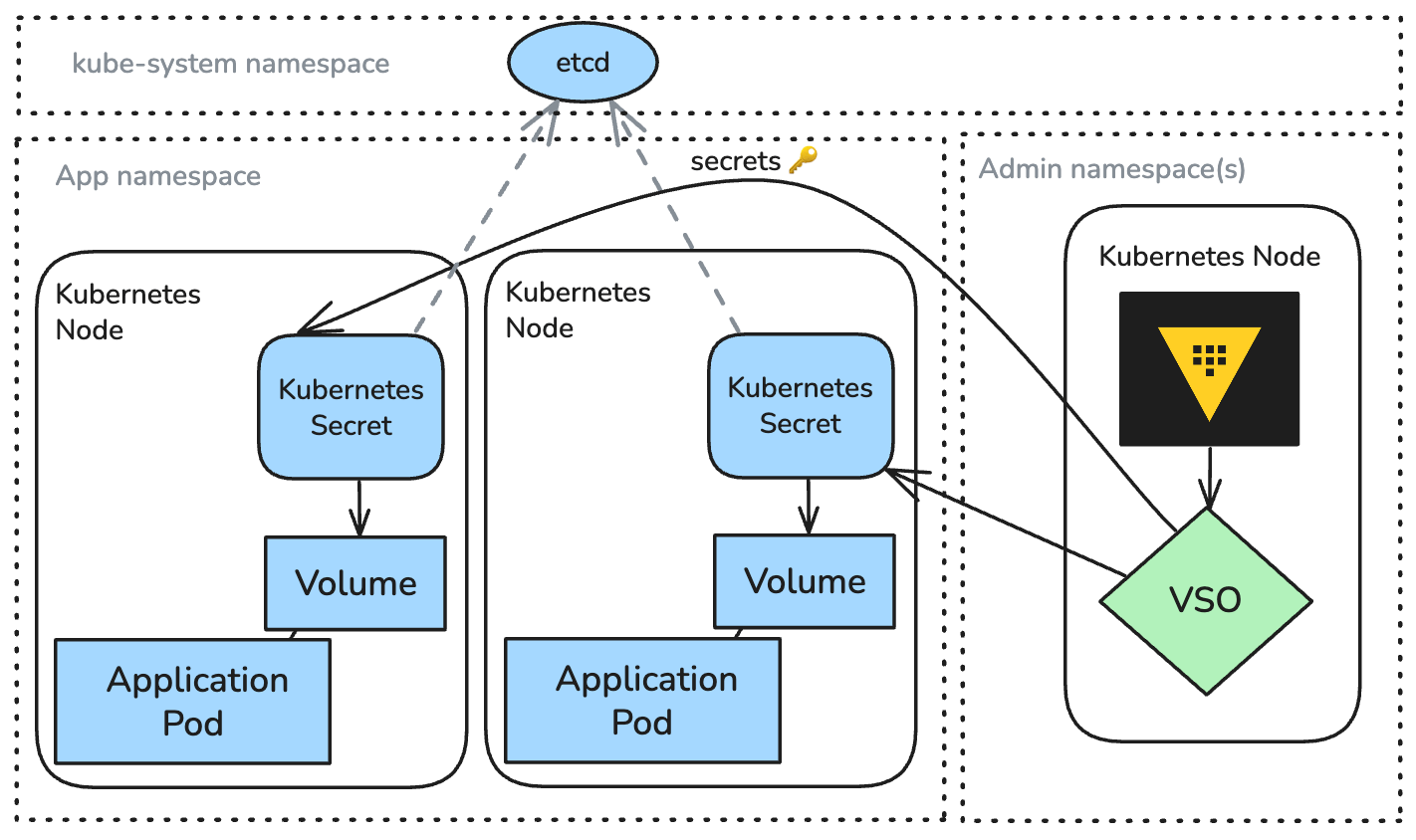
Managing secrets in Kubernetes at scale is a persistent challenge for platform teams. Native Kubernetes Secrets fall short of enterprise governance requirements, especially when dealing with hybrid cloud environments and the need for centralized lifecycle management—from generation to rotation to revocation. The Vault Secrets Operator (VSO) emerges as the modern, Kubernetes-native solution to bridge this gap by seamlessly integrating HashiCorp Vault with Kubernetes or OpenShift clusters. VSO standardizes secret delivery while preserving your existing workflow: pods still consume secrets as native Kubernetes Secrets, but those secrets are automatically synchronized with Vault. This tutorial provides a comprehensive guide to deploying and using VSO, covering prerequisites, step-by-step configuration, common pitfalls, and a summary of its advantages over alternative patterns like the Vault agent sidecar injector or the Secrets Store CSI driver.
Prerequisites
- A running Kubernetes cluster (version 1.19 or later) or OpenShift cluster.
- Access to a HashiCorp Vault instance (either self-managed or via Vault Enterprise).
- kubectl or oc CLI installed and configured.
- Helm (v3) installed for installing the VSO Helm chart.
- Basic familiarity with Kubernetes custom resource definitions (CRDs) and operators.
Step-by-Step Guide
1. Install the Vault Secrets Operator
VSO is typically installed via Helm. Add the official HashiCorp Helm repository and install the operator into a dedicated namespace (e.g., vault-secrets-operator).
helm repo add hashicorp https://helm.releases.hashicorp.com
helm repo update
helm install vault-secrets-operator hashicorp/vault-secrets-operator \
  --namespace vault-secrets-operator --create-namespace
This deploys the operator and its CRDs: VaultAuth, VaultStaticSecret, VaultDynamicSecret, VaultPKISecret, and VaultConnection. Verify the operator pod is running: kubectl get pods -n vault-secrets-operator.
2. Configure a Vault Connection
Define a VaultConnection custom resource to tell VSO how to reach your Vault instance. For example, vault-connection.yaml:
apiVersion: secrets.hashicorp.com/v1beta1
kind: VaultConnection
metadata:
  name: vault-conn
  namespace: production
spec:
  address: https://vault.example.com:8200
  skipTLSVerify: false
  tlsSecretRef: vault-tls  # optional, a Kubernetes secret with CA cert
Apply with kubectl apply -f vault-connection.yaml. Ensure connectivity by checking operator logs.
3. Create a VaultAuth Resource
VSO needs authentication to Vault. The VaultAuth custom resource specifies the authentication method, typically Kubernetes auth (default) or token-based. Example using Kubernetes auth (service account token):
apiVersion: secrets.hashicorp.com/v1beta1
kind: VaultAuth
metadata:
  name: vault-auth
  namespace: production
spec:
  vaultConnectionRef: vault-conn
  method: kubernetes
  mount: kubernetes
  kubernetes:
    role: my-app-role
    serviceAccount: my-app-sa  # optional, defaults to default
Apply the resource. The operator will use the service account token to authenticate to Vault and obtain a token.
4. Define a Secret to Synchronize
VSO provides two main resource types: VaultStaticSecret for static secrets (fixed values) and VaultDynamicSecret for dynamic secrets (e.g., database credentials). Example for a static secret pulling from Vault KV v2:
apiVersion: secrets.hashicorp.com/v1beta1
kind: VaultStaticSecret
metadata:
  name: my-static-secret
  namespace: production
spec:
  vaultAuthRef: vault-auth
  mount: secret
  type: kv-v2
  path: my-app/config
  refreshAfter: 1h
  destination:
    name: my-app-secret   # name of the Kubernetes secret to create/update
    create: true
    labels:
      app: my-app
    annotations:
      managed-by: vso
Apply it. VSO will immediately create (or update) a Kubernetes secret named my-app-secret in the same namespace, containing all key-value pairs from the Vault path. The refreshAfter field sets a sync interval.
5. Use the Secret in Pods
Your pods can consume the generated Kubernetes secret as usual—via environment variables, volume mounts, or directly through volume mounts. Example pod spec:
apiVersion: v1
kind: Pod
metadata:
  name: my-app
spec:
  containers:
  - name: app
    image: my-app:latest
    env:
    - name: DB_PASSWORD
      valueFrom:
        secretKeyRef:
          name: my-app-secret
          key: password
    volumeMounts:
    - name: config
      mountPath: /etc/config
      readOnly: true
  volumes:
  - name: config
    secret:
      secretName: my-app-secret
No changes to your application code are needed. VSO automatically keeps the Kubernetes secret updated as the Vault secret changes (within the refresh interval).
6. (Optional) Using VSO with CSI Driver for Protected Secrets
For higher security requirements (e.g., preventing secret exposure in etcd), VSO can be combined with a built-in CSI driver mode. Set spec.destination.type: csi in the VaultStaticSecret to have the driver mount the secret directly into pods without storing it in Kubernetes secrets. See VSO CSI documentation for details.
Common Mistakes
- Ignoring RBAC: VSO requires appropriate roles and service accounts for authentication. Ensure the
VaultAuthrole exists in Vault and the service account has permission to read the secret path. - Misconfigured VaultConnection: Incorrect address or TLS settings will prevent VSO from connecting. Test with
curlinside the operator pod. - Not setting refreshAfter: Without
refreshAfter, the secret is only synced once. For dynamic rotation, set a reasonable interval. - Overwriting existing secrets: Using
create: truewill fail if the destination secret already exists. Usecreate: falseand setcreate: false+update: trueto update an existing secret. - Namespace mismatch: The
VaultConnectionandVaultAuthmust be in the same namespace as the secret resources, or use cluster-scoped references appropriately.
Summary
The Vault Secrets Operator simplifies enterprise secret management on Kubernetes by automating the lifecycle of secrets from Vault into native Kubernetes Secrets. It eliminates the need for sidecars or custom CSI drivers for most use cases, keeps the developer experience unchanged, and integrates seamlessly with existing Vault policies. By following this guide, you can deploy VSO, configure authentication, and sync secrets with minimal overhead, ensuring your clusters maintain security and compliance at scale.